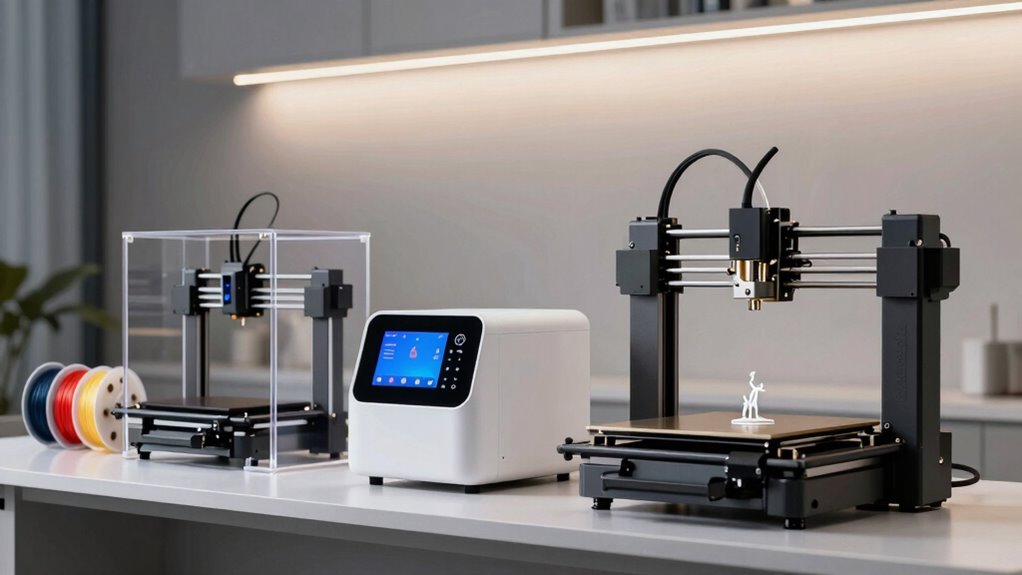
Choosing the right 3D printer for artistic and design work involves balancing vibrant color capabilities, precision, speed, and ease of use. The Bambu Lab P1S shines with its multi-material, multi-color options and fast performance, making it ideal for rapid prototyping and complex models. The FLASHFORGE AD5X offers a large build volume and multi-color printing at high speeds, suited for detailed projects and larger pieces. Meanwhile, the Bambu Lab P2S Combo combines high-speed accuracy with multi-material flexibility, perfect for professionals seeking seamless workflow integration. Each of these options balances tradeoffs like complexity, cost, and compatibility, helping you choose based on your specific needs and skill level.

Get art and craft supplies delivered free with Prime
- Fast, free delivery on millions of items
- Prime Video, Amazon Music and more included
- Member-only deals all year
Complete the kit


Key Takeaways
- Multi-color and multi-material capabilities significantly enhance artistic flexibility.
- Speed and large build volume improve productivity for complex projects.
- Ease of setup and automation are crucial for beginners, but advanced features may challenge newcomers.
- Compatibility with various filaments impacts the range of creative possibilities.
- Tradeoffs often involve balancing cost, complexity, and feature richness.
| Bambu Lab P1S 3D Printer |  | Best Overall for Versatile Multi-Color Printing | Color Capabilities: Up to 16 colors | Printing Speed: 500mm/s | Acceleration: 20000 mm/s² | VIEW ON AMAZON | See Our Full Breakdown |
| FLASHFORGE AD5X Multi-Color 3D Printer with Auto Leveling and High-Speed Printing |  | Best for Large, Detailed Multi-Color Projects | Maximum Printing Speed: 600mm/s | Build Volume: 220 x 220 x 220mm | Nozzle Temperature: up to 300°C | VIEW ON AMAZON | See Our Full Breakdown |
| Bambu Lab P2S Combo, P2S 3D Printer & AMS 2 Pro |  | Best for Precision and Multi-Color Flexibility | Print Speed: 600 mm/s | Setup Time: 15 minutes | Filament Drying Temperature: 65 °C | VIEW ON AMAZON | See Our Full Breakdown |
| Anycubic Kobra S1 Max Combo 3D Printer |  | Best for Large-Scale, Multi-Color Projects | Build Volume: 350x350x350 mm³ | Dimensions: 21 x 23 x 19 inches | Item Weight: 77.8 pounds | VIEW ON AMAZON | See Our Full Breakdown |
| Creality K2 Plus Combo 3D Printer |  | Best for Automated Multi-Color High-Precision Printing | Build Volume: 13.78 x 13.78 x 13.78 inches | Max Speed: 600mm/s | Filament Compatibility: High-temp up to 350°C | VIEW ON AMAZON | See Our Full Breakdown |
| 3d printers for artists and designer | Build Volume |
|---|---|
| Bambu Lab P1S 3D Printer | — |
| FLASHFORGE AD5X Multi-Color 3D | 220 x 220 x 220mm |
| Bambu Lab P2S Combo | — |
| Anycubic Kobra S1 Max Combo 3D | 350x350x350 mm³ |
| Creality K2 Plus Combo 3D Prin | 13.78 x 13.78 x 13.78 inches |
More Details on Our Top Picks
Bambu Lab P1S 3D Printer
The Bambu Lab P1S stands out for its vibrant multi-color and multi-material printing, thanks to its ability to support up to 16 colors. Its high-speed performance up to 500mm/s and automatic bed leveling streamline production, making it accessible for users of all skill levels. Compared to other options, it excels in multi-material versatility but requires connection to the Bambu Lab AMS for full multi-color capabilities, which adds complexity and cost. It’s a balanced choice for artists who want vibrant, multi-material outputs without sacrificing speed or setup simplicity.
Pros:- Vibrant multi-color/multi-material printing
- High-speed performance reduces wait times
- Automatic bed leveling ensures consistent results
- Easy setup suitable for all skill levels
Cons:- Requires connection to Bambu Lab AMS for multi-color printing
- Not compatible with carbon or glass fiber reinforced filaments
Best for: Artists and designers seeking vibrant multi-material, multi-color outputs with user-friendly setup
Not ideal for: Those needing compatibility with carbon or glass fiber reinforced filaments
- Color Capabilities:Up to 16 colors
- Printing Speed:500mm/s
- Acceleration:20000 mm/s²
- Enclosure:Fully enclosed body
- Auto Bed Leveling:Yes
- Supported Filaments:PLA, PETG, TPU, PVA, PET ABS, ASA; Capable: PA, PC; Not recommended: Carbon/Glass Fiber
Our verdict“A versatile, fast, and reliable choice for artists who prioritize multi-material color options without complex setup.”
FLASHFORGE AD5X Multi-Color 3D Printer with Auto Leveling and High-Speed Printing
The FLASHFORGE AD5X offers a compelling combination of large build volume and multi-color printing with up to four colors supported simultaneously. Its all-metal Core XY structure ensures stability, and its high-speed capability up to 600mm/s accelerates project completion. However, the setup process can be complex for beginners, and high-speed operation demands precise calibration. Compared with smaller, simpler models, the AD5X is better suited for artists working on larger or more detailed pieces, but it may require more technical skill to operate effectively.
Pros:- Supports multi-color printing for detailed, vibrant designs
- Automatic filament detection reduces downtime
- High-speed printing for quick project turnaround
- Large build volume for diverse projects
Cons:- Complex setup may challenge new users
- High-speed printing requires precise calibration
- Limited info on filament compatibility
Best for: Artists and hobbyists needing large, vibrant multi-color prints with high speed
Not ideal for: Beginners or those preferring simple plug-and-play solutions
- Maximum Printing Speed:600mm/s
- Build Volume:220 x 220 x 220mm
- Nozzle Temperature:up to 300°C
- Color Capabilities:4 colors
- Filament System:Intelligent Filament System (IFS)
- Structure:All-metal Core XY
Our verdict“A robust, large-volume solution for artists pushing the boundaries of multi-color, high-speed printing, with some setup complexity.”
Bambu Lab P2S Combo, P2S 3D Printer & AMS 2 Pro
The Bambu Lab P2S Combo pairs a high-speed, highly accurate P2S 3D printer with the AMS 2 Pro module for seamless multi-material, multi-color printing. Its features like adaptive airflow, built-in filament drying, and automatic calibration make it a top choice for professionals. While the P2S alone doesn’t support multi-color printing, the Combo version offers tremendous workflow flexibility. This model is best for those who need precision and multi-material versatility but are comfortable navigating complex features.
Pros:- High-speed printing with exceptional accuracy
- Automatic calibration and quick setup
- Supports multi-color and multi-material workflows with AMS 2 Pro
- Adaptive airflow for optimal cooling
Cons:- Does not support multi-color printing on the base P2S model
- Complex features have a learning curve for beginners
Best for: Professionals and advanced hobbyists requiring precision and multi-material flexibility
Not ideal for: Beginners or users seeking simple, plug-and-play solutions
- Print Speed:600 mm/s
- Setup Time:15 minutes
- Filament Drying Temperature:65 °C
- Chamber Temperature:50 °C
- Air Filtration:Carbon filter
Our verdict“An excellent choice for professionals demanding high precision and multi-material flexibility, with a moderate learning curve.”
Anycubic Kobra S1 Max Combo 3D Printer
The Anycubic Kobra S1 Max Combo offers a massive 350x350x350mm build volume, supporting multi-color printing with up to 16 colors. Its fully enclosed CoreXY structure and high-speed capabilities up to 600mm/s make it ideal for engineers and makers working on large, detailed models. Features like smart auto-leveling and a heated chamber enhance print quality, but its weight and size require significant space and setup effort. Compared with smaller printers, it excels in large-scale projects but demands a more substantial investment in space and learning time.
Pros:- Large build volume supports full-scale models
- High-speed printing reduces production time
- Supports up to 16 colors with automatic switching
- Enclosed frame ensures stability and quality
Cons:- Heavy and bulky, requires significant space
- Mixed reviews indicate potential reliability issues
- Complex features may challenge beginners
Best for: Artists and designers needing large, multi-color prototypes or sculptures
Not ideal for: Those with limited space or seeking a compact, simple machine
- Build Volume:350x350x350 mm³
- Dimensions:21 x 23 x 19 inches
- Item Weight:77.8 pounds
- Hotend Temperature:350°C
- Heated Chamber:65°C
- Color Support:Up to 16 colors
- Auto-Leveling:LeviQ 3.0 49-point
Our verdict“A powerful large-format printer tailored for ambitious projects, though it requires space and technical familiarity.”
Creality K2 Plus Combo 3D Printer
The Creality K2 Plus Combo offers a large 13.78 x 13.78 x 13.78-inch build volume with four CFS units supporting up to 16 colors. Its advanced automation with AI cameras and durable aluminum frame make it suitable for high-precision, multi-color prints of complex models. However, the setup process is more involved, and the high feature set can be overwhelming for beginners. This printer targets experienced users who want automation and multi-color options in a single, robust platform.
Pros:- Supports up to 16 colors with multi-CFS units
- Large build volume for big projects
- Automation features with AI cameras for monitoring
- High-temperature capability for advanced filaments
Cons:- Setup is complex and time-consuming
- High cost reflects advanced features
- Requires high filament handling knowledge
Best for: High-end artists and designers needing large, multi-color, automated workflows
Not ideal for: Beginners or hobbyists seeking straightforward, easy-to-use machines
- Build Volume:13.78 x 13.78 x 13.78 inches
- Max Speed:600mm/s
- Filament Compatibility:High-temp up to 350°C
- Number of CFS Units:4
- AI Cameras:2
- Frame Material:Aerospace-grade aluminum alloy
Our verdict“A feature-rich, automated large-format printer designed for professional workflows, with a steep learning curve.”
How We Picked
Our selection process focused on printers specifically suited for artists and designers, prioritizing multi-color options, precision, ease of use, and build volume. We compared models based on core features like speed, material support, automation, and user-friendliness, ensuring that each pick offers a distinct role—from beginner-friendly options to professional-grade machines. Tradeoffs such as complexity versus versatility and cost versus performance were carefully considered to recommend options for a range of creative workflows.
Factors to Consider When Choosing 3d Printers For Artists And Designers
When selecting a 3D printer for artistic and design purposes, consider your workflow, desired output quality, and project size. Multi-color and multi-material capabilities unlock creative freedom, but often come with increased complexity and cost. Speed and build volume influence your productivity, especially for larger or more intricate models. Ease of setup and automation can save time and reduce frustration, especially for beginners. Balancing these factors helps you find a machine that matches your skill level and creative ambition.
Key Features for Artists and Designers
Multi-color printing is essential to achieve vibrant, complex designs, but it often requires special hardware or external modules. High-speed printing accelerates production, particularly for prototypes or multiple iterations. Large build volumes enable full-scale models or sculptures, while automation features like automatic bed leveling and filament management reduce manual intervention. Compatibility with a range of materials expands creative options, from flexible TPU to high-temp ABS. Understanding your project scope and workflow needs will guide your choice among these features.
Tradeoffs to Consider
More advanced features typically come at a higher price and complexity. Multi-color and multi-material systems may require additional setup and calibration, which can be daunting for newcomers. Larger build volumes demand more space and can increase the cost of the machine. Speed can sometimes compromise detail if calibration isn’t perfect. Recognizing which tradeoffs are acceptable based on your skill level and project demands is key to choosing the right printer.
Beginner vs. Professional Needs
If you are just starting out, look for models with straightforward setup, automatic calibration, and fewer moving parts. These will reduce the learning curve and help you focus on design. For experienced users, investing in feature-rich machines with advanced automation, high-speed capabilities, and large build sizes can streamline workflows and enable more ambitious projects. Consider your comfort with complex technology and your project requirements when making a decision.
Frequently Asked Questions
What is the main advantage of multi-color 3D printing for artists?
Multi-color 3D printing allows artists to create highly detailed, vibrant, and complex designs directly in the printing process, eliminating the need for post-processing or painting. It enables more realistic and dynamic models, especially for visual arts, prototypes, and decorative pieces, expanding creative possibilities significantly.
Are high-speed 3D printers suitable for detailed artistic work?
High-speed 3D printers can be very beneficial for artists who need to produce multiple prototypes or iterations quickly. However, achieving fine details at high speeds requires precise calibration and sometimes compromises on resolution. For intricate, highly detailed work, a slower, more controlled print might still be preferable, but modern high-speed models are increasingly capable.
How important is build volume for artistic 3D printing?
Build volume is critical if you plan to create large sculptures, full-scale models, or multiple objects simultaneously. A larger volume provides more flexibility, but often increases the machine’s size and cost. For smaller, detailed work, a more compact printer can be sufficient and easier to manage.
What are the main challenges with multi-material 3D printers?
Multi-material printers often require complex hardware setups, precise calibration, and specific filament management. They can be more prone to jams or errors, especially if different filament types have varying melting points or flow characteristics. Beginners may find these systems intimidating without prior experience or technical skills.
Is multi-color printing compatible with all filament types?
Not all filament types are compatible with multi-color systems, especially those requiring high-temperature or reinforced filaments like carbon fiber. Most multi-color printers support standard filaments such as PLA, PETG, and TPU, but compatibility with specialty materials can be limited or require specific hardware modifications.
Conclusion
For artists and designers just starting out or working on smaller projects, models like the Bambu Lab P1S offer a great balance of ease of use, multi-material support, and speed. Professionals or those with larger-scale needs should consider the Anycubic Kobra S1 Max for its massive build volume, or the Creality K2 Plus for automation and multi-color precision. Meanwhile, the FLASHFORGE AD5X provides a versatile option for those needing large, vibrant multi-color prints without the complexity of larger systems. Your choice hinges on your project scope, budget, and experience level—matching the right machine to your creative ambitions ensures the best results.
Halloween Picks
halloween
As an affiliate, we earn on qualifying purchases.