The best 3D printing pens balance comfortable control, useful temperature and speed settings, and supplies that suit the way you plan to create. My best overall pick is the MYNT3D Pro 3D Pen Kit, which pairs adjustable controls with a DesignPad and a range of PLA colors. The 3Doodler Start+ Essentials stands out for younger makers, while the SCRIB3D PRO Set adds interchangeable nozzles for users who want more ways to shape a line. The main tradeoffs are control versus simplicity, included accessories versus flexibility, and kid-friendly materials versus broader filament compatibility. Read on for the full comparison and guidance on which pen fits your projects.

Get art and craft supplies delivered free with Prime
- Fast, free delivery on millions of items
- Prime Video, Amazon Music and more included
- Member-only deals all year
Key Takeaways
- Adjustable control drives the adult picks: The MYNT3D Pro kit and MYNT3D Professional pen prioritize fine-tuning speed or temperature, while simpler kits favor a more approachable setup.
- Included extras change the value of a bundle: A DesignPad, silicone mat, stencil book, or multiple filament colors can help a first project get started, but they do not replace the need to check material compatibility.
- Kid-focused does not mean interchangeable with adult pens: The 3Doodler Start+ is designed around younger users and its own material system, so buyers should not assume it works like a standard PLA/ABS pen.
- SCRIB3D P1 bundles are differentiated mainly by what comes with them: Compare the included filament assortment and work surface rather than expecting each P1 bundle to offer a different core pen experience.
- Specialized features matter most when they match a real project: The SCRIB3D PRO’s interchangeable nozzles offer shaping options, while a basic display or large color pack may matter less to someone making simple models.
| SCRIB3D Advanced 3D Printing Pen Bundle with 20-Color PLA Filament Refill Pack |  | Best for Color Variety | Filament material: PLA | Filament diameter: 1.75 mm | Total filament length: 348 feet | VIEW LATEST PRICE | See Our Full Breakdown |
| SCRIB3D P1 3D Printing Pen Bundle with 6 Spools of Tri-Color PLA Filament |  | Best for Adjustable Materials | Model: SCRIB3D P1 | Filament diameter: 1.75 mm | Compatible filaments: PLA and ABS | VIEW LATEST PRICE | See Our Full Breakdown |
| MYNT3D Pro 3D Pen Kit with 10-Color PLA Filament and DesignPad |  | Best for Guided Drawing | Filament material: PLA | Filament diameter: 1.75 mm | Filament colors: 10 | VIEW LATEST PRICE | See Our Full Breakdown |
| SCRIB3D P1 3D Printing Pen Bundle with Silicone Mat and 20-Color PLA Filament |  | Best for Mat-Assisted Projects | Model: SCRIB3D P1 | Filament material: PLA | Filament diameter: 1.75 mm | VIEW LATEST PRICE | See Our Full Breakdown |
| SCRIB3D P1 3D Printing Pen Kit with Display |  | Best Starter Kit | Model: SCRIB3D P1 | Weight: 12.9 ounces | Dimensions: 4.61 × 7.87 × 1.97 inches | VIEW LATEST PRICE | See Our Full Breakdown |
| 3Doodler Start+ Essentials 3D Pen Set for Kids, Ages 6+ |  | Best for Young Children | Recommended Age: 6 years and up | Filament Type: PCL | Power Source: USB-C Rechargeable | VIEW LATEST PRICE | See Our Full Breakdown |
| 3Doodler Flow 3D Printing Pen with Filaments, Stencil Book, and Guide |  | Best Compact for Travel | Compatible Filaments: 1.75 mm PLA, ABS, Wood | Display: Integrated LCD | Weight: 15.8 ounces | VIEW LATEST PRICE | See Our Full Breakdown |
| SCRIB3D Advanced 3D Printing Pen Kit |  | Best for Control and Precision | Speed Settings: 8 | Warm-up Time: 2–3 minutes | Filament Included: 5 colors, 15 meters (~50 feet) | VIEW LATEST PRICE | See Our Full Breakdown |
| MYNT3D Professional 3D Printing Pen with OLED Display | 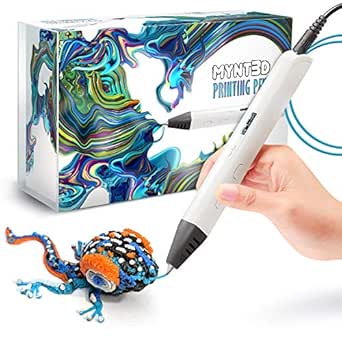 | Best for Temperature Precision | Temperature Adjustment: 1 °C increments | Display: OLED | Weight: 12 ounces | VIEW LATEST PRICE | See Our Full Breakdown |
| MYNT3D Super 3D Printing Pen, 1.75 mm ABS and PLA Compatible |  | Best Lightweight Option | Weight: 7.7 ounces | Filament Compatibility: 1.75 mm ABS and PLA | Speed Control: Stepless variable | VIEW LATEST PRICE | See Our Full Breakdown |
| SCRIB3D P1 3D Printing Pen Bundle with 23 PLA Filament Colors |  | Best Value for Color Variety | Model: SCRIB3D P1 | Filament Type: PLA | Starter Filament: 3 colors, 30 feet | VIEW LATEST PRICE | See Our Full Breakdown |
| SCRIB3D PRO 3D Printing Pen Set with Filament, Interchangeable Nozzles, and DoodlePad |  | Best for Advanced Material Experimentation | Age Recommendation: 14+ | Filament Size: 1.75 mm | Compatible Materials: PLA, PHA, wood, bronze/copper, steel, Vibers, and CF (Carbon Fiber) 10 | VIEW LATEST PRICE | See Our Full Breakdown |
| 3Doodler Create+ 3D Printing Pen, Steel Blue |  | Best for Versatile Plastic Types | Brand: Office Depot | Weight: 1.3 pounds | Dimensions: 10.8 x 4.55 x 3.13 inches | VIEW LATEST PRICE | See Our Full Breakdown |
| 3D printing pen | Weight | Dimensions |
|---|---|---|
| SCRIB3D Advanced 3D Printing P | — | — |
| SCRIB3D P1 3D Printing Pen Bun | — | — |
| MYNT3D Pro 3D Pen Kit with 10- | — | — |
| SCRIB3D P1 3D Printing Pen Bun | — | — |
| SCRIB3D P1 3D Printing Pen Kit | 12.9 ounces | 4.61 × 7.87 × 1.97 inches |
| 3Doodler Start+ Essentials 3D | 10.72 ounces | 9.06 x 6.02 x 2.56 inches |
| 3Doodler Flow 3D Printing Pen | 15.8 ounces | 3.1 x 10.74 x 4.44 inches |
| SCRIB3D Advanced 3D Printing P | 11.7 ounces | 4.06 x 7.8 x 2.48 inches |
| MYNT3D Professional 3D Printin | 12 ounces | 7.99 × 5.2 × 2.6 inches |
| MYNT3D Super 3D Printing Pen | 7.7 ounces | 3.98 x 8.31 x 2.32 inches |
| SCRIB3D P1 3D Printing Pen Bun | — | — |
| SCRIB3D PRO 3D Printing Pen Se | — | — |
| 3Doodler Create+ 3D Printing P | 1.3 pounds | 10.8 x 4.55 x 3.13 inches |
More Details on Our Top Picks
SCRIB3D Advanced 3D Printing Pen Bundle with 20-Color PLA Filament Refill Pack
I’d pick this bundle for projects where switching colors matters more than having a drawing mat or multiple filament types. Its 348 feet of PLA in 20 colors gives makers far more material to experiment with than the SCRIB3D P1 kit with 30 feet of starter filament, while the LCD screen and variable speed make settings easier to monitor and adjust. The ergonomic design, ceramic nozzle, and anti-clogging features support longer crafting sessions, and the stencil book and project guide offer a useful starting point. The tradeoff is that the supplied material is PLA, and the product information doesn’t describe compatibility with other filament types. Compared with the SCRIB3D P1 bundle with a silicone mat, this one prioritizes a larger stated filament supply over guided drawing surfaces.
Pros:- Includes 348 feet of PLA filament across 20 colors
- LCD screen and variable speed control support clearer adjustments while drawing
- Ceramic nozzle and anti-clogging design address common interruptions
- Stencil book and project guide help users get started
Cons:- Compatibility with filament types beyond the included PLA is not described
- No silicone mat is listed for shaping or protecting the work surface
Best for: Makers and families planning repeated projects who want many PLA colors on hand without buying refills right away
Not ideal for: Users who want to work with ABS or need a silicone drawing mat, since neither is specified as part of this bundle
- Filament material:PLA
- Filament diameter:1.75 mm
- Total filament length:348 feet
- Filament colors:20
- Controls:Variable speed
- Display:LCD screen
- Nozzle:Ceramic
- Included accessories:Stencil book and project guide
Our verdict“Choose this bundle if a broad PLA color selection and a generous stated filament supply matter more than a mat or documented ABS support.”
SCRIB3D P1 3D Printing Pen Bundle with 6 Spools of Tri-Color PLA Filament
This P1 bundle suits buyers who want more control over temperature and speed, plus the option to use either PLA or ABS. Adjustable temperature and stepless speed control let users tune the pen to the material and pace of a project, while auto-sleep and anti-clogging technology add practical safeguards. Its six extra spools provide 200 feet of tri-color PLA, a different kind of variety from the SCRIB3D Advanced bundle’s 20 separate colors: here, the appeal is multicolor filament rather than a wider palette of single colors. A ceramic nozzle and one-year warranty round out the package. The tradeoff is that only three starter PLA filaments accompany the six additional spools, and the 1.75 mm diameter limits use to compatible filament.
Pros:- Compatible with both PLA and ABS filament
- Adjustable temperature and stepless speed control allow settings to be tailored to a project
- Six additional spools provide 200 feet of tri-color PLA
- Auto-sleep, anti-clogging technology, ceramic nozzle, and one-year warranty are included
Cons:- The additional filament is tri-color rather than a broad set of distinct solid colors
- The bundle lists only three starter PLA filaments alongside the six extra spools
- Filament must match the specified 1.75 mm diameter
Best for: Crafters who want adjustable temperature for PLA and ABS projects and enjoy the blended effects of tri-color PLA
Not ideal for: Beginners who want a large selection of distinct solid-color spools or a drawing mat included
- Model:SCRIB3D P1
- Filament diameter:1.75 mm
- Compatible filaments:PLA and ABS
- Additional filament:200 feet of tri-color PLA across six spools
- Speed control:Stepless
- Temperature:Adjustable
- Nozzle material:Ceramic
- Other features:Auto-sleep and anti-clogging technology
- Warranty:One year
Our verdict“Pick this P1 bundle if temperature flexibility and tri-color effects matter more than a broad assortment of solid PLA colors.”
MYNT3D Pro 3D Pen Kit with 10-Color PLA Filament and DesignPad
The MYNT3D Pro kit stands out for its two silicone drawing surfaces, which give users a place to trace designs or form shapes—useful support for anyone still learning how to guide a pen in three dimensions. Stepless speed control and adjustable temperature offer more tuning than a basic fixed-setting pen, while the replaceable sealed nozzle is designed to support continued use. The kit includes 10 PLA colors, a more focused selection than the 20-color SCRIB3D Advanced bundle, but it pairs its palette with both a DesignPad and a FreePad. That makes this a better fit for users who value guided practice over a larger filament stash. The supplied filament is PLA only, and its one-year limited warranty is a defined boundary for buyers seeking longer coverage.
Pros:- Includes both a silicone DesignPad and a FreePad for tracing and shaping
- Stepless speed control helps adapt filament flow to different drawing tasks
- Adjustable temperature provides control over pen settings
- Replaceable sealed nozzle is designed for ongoing use
Cons:- Included filament is PLA, so the supplied material selection is limited
- The warranty is limited to one year
- Its 10-color selection is smaller than the 20-color SCRIB3D Advanced bundle
Best for: Newer makers, students, and design-focused hobbyists who want surfaces for tracing and shaping practice
Not ideal for: Users who need ABS included or want the largest supplied color selection, such as the 20-color SCRIB3D Advanced bundle offers
- Filament material:PLA
- Filament diameter:1.75 mm
- Filament colors:10
- Included drawing surfaces:DesignPad and FreePad
- DesignPad material:Silicone
- Speed control:Stepless
- Temperature:Adjustable
- Nozzle:Replaceable sealed nozzle
- Warranty:One-year limited
Our verdict“Choose the MYNT3D Pro kit if guided drawing surfaces matter more to you than a larger color assortment or supplied ABS.”
SCRIB3D P1 3D Printing Pen Bundle with Silicone Mat and 20-Color PLA Filament
This P1 bundle is the clearest choice for buyers who want their work surface built into the kit. Its two-sided, heat-resistant silicone mat supplies shapes and patterns for practice, while 320 feet of PLA in 20 colors leaves room for varied projects. A display pen, stencil book, project guide, starter filament, and power adapter make the set feel more ready for structured activities than the SCRIB3D P1 kit with 30 feet of filament and no listed mat. It gives up some of the supplied filament length found in the SCRIB3D Advanced bundle, which lists 348 feet, but adds a dedicated design surface. The main limitation is material scope: the refill pack is specified as 1.75 mm PLA, and the mat is chiefly a practice and design aid.
Pros:- Includes 320 feet of PLA in 20 colors
- Two-sided, flexible, heat-resistant silicone mat offers patterns and shapes for guided work
- Display pen, stencil book, project guide, and power adapter are included
- Starter filament helps users begin without sourcing supplies separately
Cons:- The refill pack is specified for 1.75 mm PLA rather than a broader range of materials
- The mat is described as a practice and design surface, limiting its stated role
- Its listed filament length is less than the 348 feet in the SCRIB3D Advanced bundle
Best for: Families, classrooms, and hobbyists who want a guided work surface alongside a varied PLA assortment
Not ideal for: Makers seeking documented ABS support or a mat with uses beyond drawing and design practice
- Model:SCRIB3D P1
- Filament material:PLA
- Filament diameter:1.75 mm
- Total filament length:320 feet
- Filament colors:20
- Pen display:Display included
- Mat:Two-sided, flexible, heat-resistant silicone
- Included accessories:Starter filament, stencil book, project guide, and power adapter
Our verdict“Choose this P1 set if a reusable silicone design mat is more useful to you than the longest filament supply in the lineup.”
SCRIB3D P1 3D Printing Pen Kit with Display
For a first 3D pen, this SCRIB3D P1 keeps the package straightforward: three PLA colors and 30 feet of filament, plus a stencil guide, manual, and power adapter. Its stepless speed control can shift from slower detail work to faster filling, and adjustable temperature supports both PLA and ABS—a useful capability not specified for the SCRIB3D Advanced bundle. The ceramic nozzle and two-minute auto-sleep add practical features without relying on a large accessory set. The tradeoff is a modest supply of filament: the SCRIB3D P1 silicone-mat bundle includes 20 colors and 320 feet, making it a stronger fit for users ready to make a wider range of projects. This kit favors a simpler entry point over abundant materials.
Pros:- Stepless speed control supports both detailed drawing and faster filling
- Adjustable temperature and compatibility with PLA and ABS broaden material options
- Includes a power adapter, manual, and stencil guide
- Two-minute auto-sleep and ceramic nozzle are built into the pen
Cons:- Only three colors and 30 feet of filament are included
- Warm-up takes about two to three minutes
- The nozzle becomes hot during use
Best for: First-time users who want a basic P1 kit with adjustable controls and the option to use PLA or ABS
Not ideal for: Frequent makers who want a large color selection, a silicone mat, or enough included filament for extended projects
- Model:SCRIB3D P1
- Weight:12.9 ounces
- Dimensions:4.61 × 7.87 × 1.97 inches
- Filament compatibility:PLA and ABS
- PLA temperature range:160–210°C (320–410°F)
- ABS temperature range:210–235°C (410–455°F)
- Included filament:Three colors, 30 feet total
- Nozzle:Ceramic
- Auto-sleep:Two minutes
Our verdict“Choose this kit as a straightforward starting point if adjustable PLA and ABS support matters more than a large filament bundle.”
3Doodler Start+ Essentials 3D Pen Set for Kids, Ages 6+
This pen stands out as the safest entry point for children under ten, primarily because it uses PCL filament that heats to a much lower temperature than standard PLA or ABS. Unlike the SCRIB3D Advanced or the 3Doodler Flow, which require careful handling of hot nozzles, the Start+ is designed with no external hot parts, drastically reducing burn risks. The inclusion of a DoodlePad and activity guide makes it an excellent educational tool, allowing kids to follow structured projects rather than struggling with freehand techniques immediately. However, the tradeoff is versatility; PCL is softer and less durable than the PLA used in adult-oriented models, meaning creations may warp if left in warm environments. It is strictly for creative play and basic STEM learning, not for producing sturdy, functional parts.
Pros:- Uses low-temperature PCL filament, eliminating burn hazards for young users
- Comes with a comprehensive starter kit including a DoodlePad and activity guide
- USB-C rechargeable battery allows for cordless use, enhancing portability
Cons:- PCL filament is softer and less durable than PLA or ABS options
- Limited to a specific filament type, restricting material experimentation
- Not suitable for users over age 10 looking for advanced precision
Best for: Parents seeking a safe, self-contained kit for children ages 6 to 10 who are new to 3D printing concepts.
Not ideal for: Teenagers or adults wanting to print durable, heat-resistant objects or use advanced materials like ABS.
- Recommended Age:6 years and up
- Filament Type:PCL
- Power Source:USB-C Rechargeable
- Weight:10.72 ounces
- Dimensions:9.06 x 6.02 x 2.56 inches
- Included Components:Pen, 2 filament packs, DoodlePad, USB cable, guides
Our verdict“The definitive choice for young children due to its unmatched safety profile and beginner-friendly accessories.”
3Doodler Flow 3D Printing Pen with Filaments, Stencil Book, and Guide
The 3Doodler Flow distinguishes itself through its compact form factor and broad material compatibility, supporting PLA, ABS, and even wood filaments. This versatility contrasts sharply with the 3Doodler Start+, which is locked into PCL, and offers a more mature drawing experience for teens and adults. The integrated LCD provides clear temperature feedback, which is critical when switching between materials with different melting points. While it includes a stencil book to help users get started, the pen requires a plug-in power source or specific battery setup depending on the variant, and the heated nozzle demands caution. It is a step up from basic kits, offering the precision needed for detailed work, but its small size might feel cramped for users with larger hands compared to the SCRIB3D Advanced.
Pros:- Supports a wide range of filaments including PLA, ABS, and wood
- Integrated LCD screen provides real-time temperature monitoring
- Compact design makes it easier to store and transport than bulkier kits
Cons:- Heated nozzle requires careful handling to avoid burns
- Smaller body may be uncomfortable for users with large hands
- Requires compatible 1.75 mm filaments, limiting use of proprietary refills
Best for: Teens and adults who prioritize portability and want to experiment with multiple filament types like wood or ABS.
Not ideal for: Young children who need a cool-touch, battery-operated device for safe, independent use.
- Compatible Filaments:1.75 mm PLA, ABS, Wood
- Display:Integrated LCD
- Weight:15.8 ounces
- Dimensions:3.1 x 10.74 x 4.44 inches
- Included Filament:8 colors, 80 feet total
- Model:3DFLOW-US
Our verdict“A versatile, space-saving option for hobbyists who want material flexibility in a small package.”
SCRIB3D Advanced 3D Printing Pen Kit
This model earns its spot by offering eight distinct speed settings, a feature largely absent in simpler competitors like the 3Doodler Flow. This granular control allows users to adjust extrusion rates for fine details or thicker fills, making it ideal for those who want to master the mechanics of 3D drawing. The ergonomic shape with a soft-touch surface reduces hand fatigue during longer sessions, a common complaint with lighter, plasticky pens. While it includes a helpful stencil guide and five filament colors, the 2–3 minute warm-up time can interrupt creative flow compared to faster-heating models. It is a serious tool for hobbyists, but the heated nozzle and lack of battery operation mean it is best suited for a dedicated desk space rather than casual, on-the-go use.
Pros:- Eight speed settings allow for precise control over line thickness and flow
- Ergonomic design with soft-touch surface enhances comfort during extended use
- LCD screen provides clear visibility of temperature and speed settings
Cons:- Requires a 2–3 minute warm-up time before drawing can begin
- Heated nozzle poses a burn risk if not handled with care
- Only includes 15 meters of filament, requiring frequent refills
Best for: Hobbyists who value precise control over extrusion speed and line thickness for detailed artwork.
Not ideal for: Users seeking a portable, battery-operated solution or those who dislike waiting for warm-up periods.
- Speed Settings:8
- Warm-up Time:2–3 minutes
- Filament Included:5 colors, 15 meters (~50 feet)
- Weight:11.7 ounces
- Dimensions:4.06 x 7.8 x 2.48 inches
- Warranty:1 year
Our verdict“The best choice for users who prioritize fine motor control and ergonomic comfort over portability.”
MYNT3D Professional 3D Printing Pen with OLED Display
The MYNT3D Professional appeals to users who demand exacting standards, offering temperature adjustments in 1 °C increments. This level of granularity is far superior to the broader settings found on the SCRIB3D Advanced, allowing for fine-tuning when working with sensitive filaments. The OLED display provides crisp, readable feedback, which is crucial for maintaining consistent extrusion quality. However, the product information contains conflicting data regarding the temperature range and filament types, which can create confusion during setup. While the ergonomic design is comfortable, the pen requires a constant power connection, limiting its use to areas with accessible outlets. It is a robust tool for enthusiasts who want to dial in their settings, but the inconsistent documentation may frustrate beginners comparing it to the clearer instructions in the 3Doodler Start+.
Pros:- Temperature control in 1 °C increments allows for highly precise adjustments
- OLED display offers clear and easy-to-read temperature monitoring
- Lightweight and ergonomic design reduces strain during detailed work
Cons:- Product details contain conflicting information about temperature ranges
- Inconsistent labeling of included filament types (PLA vs. ABS)
- Requires a continuous power connection via AC adapter
Best for: Advanced users who need precise temperature control to optimize extrusion for specific filament brands.
Not ideal for: Beginners who prefer plug-and-play simplicity or users who rely on consistent, clear documentation.
- Temperature Adjustment:1 °C increments
- Display:OLED
- Weight:12 ounces
- Dimensions:7.99 × 5.2 × 2.6 inches
- Power Output:10 W
- Certifications:FCC, CE, RoHS
Our verdict“Ideal for technical users who value granular temperature control over user-friendly documentation.”
MYNT3D Super 3D Printing Pen, 1.75 mm ABS and PLA Compatible
Weighing in at just 7.7 ounces, the MYNT3D Super is the lightest option in this lineup, making it an excellent choice for users who find heavier pens like the 3Doodler Flow fatiguing. The ultrasonic sealed nozzle is a significant engineering feature designed to resist clogging, addressing one of the most common frustrations with 3D pens. It supports both ABS and PLA, offering good material flexibility for its size. However, the kit is sparse, including only three filament colors and no stencils or guides, which contrasts with the more comprehensive bundles from SCRIB3D. The stepless speed control is smooth, but the lack of an onboard display means users must rely on external cues or trial and error to gauge settings. It is a minimalist tool for those who already own accessories and prioritize weight savings.
Pros:- Extremely lightweight at 7.7 ounces, reducing hand fatigue
- Ultrasonic sealed nozzle design helps prevent filament clogging
- Compatible with both ABS and PLA 1.75 mm filaments
Cons:- Includes only three filament colors, requiring additional purchases
- Lacks an integrated display for temperature or speed monitoring
- No included stencils or activity guides for beginners
Best for: Experienced users who prefer a ultra-lightweight pen and already possess filament and stencils.
Not ideal for: Complete beginners who need a starter kit with guides, stencils, and a variety of filament colors.
- Weight:7.7 ounces
- Filament Compatibility:1.75 mm ABS and PLA
- Speed Control:Stepless variable
- Dimensions:3.98 x 8.31 x 2.32 inches
- Power Output:10 W
- Warranty:1-year limited
Our verdict“A minimalist, lightweight choice for seasoned users who prioritize agility over kit completeness.”
SCRIB3D P1 3D Printing Pen Bundle with 23 PLA Filament Colors
This bundle stands out for its massive filament quantity, offering over 350 feet of PLA across 23 colors. Compared to the 3Doodler Create+, which limits users to 15 colors and specific proprietary refills, this kit removes the barrier of running out of material quickly. The stepless speed slider provides smoother control than the fixed two-speed mode found on many entry-level pens, allowing for gradual acceleration during complex curves. However, the exclusive reliance on PLA means you cannot use stronger ABS or flexible filaments, limiting its use to decorative projects rather than functional prototypes. The ceramic nozzle and anti-clogging design are practical features that reduce maintenance headaches, making it a reliable choice for hobbyists who want to experiment with color palettes without investing in a premium pen.
Pros:- Includes 358 feet of filament across 23 colors, reducing refill costs
- Stepless speed slider offers precise control over extrusion rate
- Ceramic nozzle and anti-clogging design minimize jams
- Intuitive controls make it easy to operate without a learning curve
Cons:- Compatible only with PLA filament, limiting material options
- Lacks a digital display for real-time temperature or speed monitoring
Best for: Hobbyists and educators who prioritize a wide spectrum of colors for large-scale, decorative projects and want to avoid frequent refills.
Not ideal for: Users needing durable, functional prints or those who want to experiment with ABS, wood, or flexible filaments.
- Model:SCRIB3D P1
- Filament Type:PLA
- Starter Filament:3 colors, 30 feet
- Assorted Refill Filament:20 colors, 328 feet
- Controls:Intuitive controls and stepless speed slider
- Nozzle Material:Ceramic
- Key Feature:Anti-clogging design
Our verdict“Choose this if you want the best bang-for-buck color variety for standard PLA projects.”
SCRIB3D PRO 3D Printing Pen Set with Filament, Interchangeable Nozzles, and DoodlePad
The SCRIB3D PRO targets users who need more than just basic plastic; its support for wood, bronze, and carbon fiber filaments sets it apart from the standard SCRIB3D P1, which is PLA-only. The inclusion of an on-pen display for real-time temperature and speed feedback provides a level of precision that blind adjustment on simpler models cannot match. This is critical when working with sensitive materials that require specific heat profiles. However, the complexity comes with a caveat: the hot nozzle and advanced features make it less suitable for young children compared to kid-safe alternatives like the 3Doodler Start+. The ergonomic design helps mitigate fatigue during long sessions, but the learning curve is steeper. If you are serious about prototyping with mixed materials, this pen offers the necessary control and compatibility.
Pros:- Supports a wide range of materials including wood, bronze, and carbon fiber
- Real-time display shows temperature and speed for precise control
- Ergonomic design reduces hand fatigue during detailed work
- Interchangeable nozzles allow for varying line thicknesses
Cons:- Nozzle gets extremely hot, posing a safety risk for younger users
- Compatible material list includes ambiguous terms like ‘Vibers’
Best for: Advanced hobbyists and prototypers who want to experiment with specialty filaments like wood, metal, and carbon fiber.
Not ideal for: Parents looking for a safe, simple first pen for children under 14 due to high nozzle temperatures.
- Age Recommendation:14+
- Filament Size:1.75 mm
- Compatible Materials:PLA, PHA, wood, bronze/copper, steel, Vibers, and CF (Carbon Fiber) 10
- Controls:Adjustable temperature and speed
- Display:On-pen display for temperature and speed
- Included Filament Colors:Red, black, clear, bronze, wood, blue and yellow dual color, metallic gold, metallic silver, and pure white
- Package Dimensions:10.43 × 8.27 × 2.72 inches
- Item Weight:2.24 pounds
Our verdict“This is the right tool if you need precise temperature control for non-PLA materials.”
3Doodler Create+ 3D Printing Pen, Steel Blue
The 3Doodler Create+ distinguishes itself by supporting PLA, ABS, and FLEXY plastics, offering more material flexibility than the SCRIB3D P1, which is restricted to PLA. The dual-drive technology ensures consistent plastic flow, which is particularly beneficial when switching between the fast and slow modes for broad coverage or fine detail. Unlike the SCRIB3D PRO, which focuses on exotic materials, the Create+ sticks to common, accessible plastics, making it easier to find replacements. However, the reliance on proprietary 3mm refills can be a drawback compared to pens that use standard 1.75mm filament, potentially increasing long-term costs. The included project guide is a nice touch for beginners, but the pen lacks the digital precision of higher-end models, relying instead on tactile switches for speed changes.
Pros:- Supports PLA, ABS, and FLEXY plastics for varied project types
- Dual-drive technology provides consistent extrusion and control
- Fast and slow modes allow quick switching between coverage and detail
- Includes a comprehensive project guide and accessories
Cons:- Requires specific 3mm proprietary refills, limiting filament options
- Lacks digital temperature or speed display for fine-tuning
Best for: Users who want to work with both rigid (ABS) and flexible (FLEXY) plastics for jewelry or wearable art.
Not ideal for: Budget-conscious buyers who prefer using cheap, standard 1.75mm filament spools instead of proprietary refills.
- Brand:Office Depot
- Weight:1.3 pounds
- Dimensions:10.8 x 4.55 x 3.13 inches
- Model Number:9CPSODUS1E
- Color:Blue
- Compatible Plastics:PLA, ABS, and FLEXY
- Included Refills:2 packs of 3 mm plastic refills in 15 colors
- Included Guide:Ultimate Guide to Doodling with 5 projects
Our verdict“Pick this if you need the flexibility of ABS and flexible plastics without moving to exotic materials.”
How We Picked
I compared these 13 pens on the factors that shape day-to-day use: control over extrusion, clarity of temperature or speed adjustments, filament compatibility, ease of setup, and the practical value of included supplies. I also looked at whether a pen’s design suits its intended user, from child-oriented crafting to adult projects that need more precise line control. Bundle contents count when they help a buyer begin creating, but a larger filament assortment alone does not make a pen better.
The ranking gives priority to versatility and usable control, then weighs learning curve, build and accessory choices, and fit for specific users. That puts adaptable adult pens ahead for general use, while dedicated kids’ pens and accessory-rich bundles earn their place for narrower needs. Several SCRIB3D P1 listings share the same basic model, so their order reflects bundle differences rather than a claim that one has a fundamentally different pen. Product specifications and included items can vary by listing, so I recommend confirming the package details before buying.
Factors to Consider When Choosing Best 3D Printing Pens
A pen’s headline feature is only part of the decision. I would start with the user, intended material, and project type, then decide which controls and accessories will actually make a difference.
Match the pen to the person using it
A child-friendly pen and an adjustable adult model solve different problems, even when both are marketed for creative projects. For younger makers, prioritize age guidance, a manageable learning curve, and the manufacturer’s specified filament rather than adult-style temperature controls. Older beginners may benefit more from a standard PLA-compatible pen with simple speed controls, since they can grow into more detailed work. A common mistake is buying a highly adjustable model for a child who mainly wants quick, supervised crafts. The reverse mistake is choosing a restricted kids’ system for an adult who wants to experiment with different materials. Match supervision and handling needs to the actual user, not just the project idea.
Check filament compatibility before choosing a bundle
Filament diameter and material type determine whether refills will work with a pen; color count does not answer either question. PLA is often a practical starting material for hobby projects, while ABS-compatible options may suit users who specifically need that material and can follow the maker’s safety guidance. Some child-oriented pens use a distinct low-temperature filament system, so standard PLA or ABS should not be assumed compatible. Before purchasing extra supplies, compare the pen’s stated diameter and supported materials with the refill packaging. Avoid mixing materials simply because they look similar or fit into the feed opening. A compatible starter bundle can reduce guesswork, but future refill availability matters too.
Choose controls that fit your level of detail
Variable speed can help a user slow down around corners and move faster across longer lines, while temperature adjustment can give more control over how a supported filament flows. Those controls are useful only if they are easy to understand and the user plans to experiment. For basic shapes and casual crafting, a simpler feed mechanism may be less distracting than a screen full of settings. For fine structures or switching between compatible materials, adjustable controls can be worth the added learning. Do not treat a display as proof of better output; it is valuable when it makes settings readable and repeatable. Think about whether you need repeatable control or just a straightforward way to extrude plastic.
Treat included accessories as workflow tools
A mat, stencil book, or design pad can make early projects easier by providing a surface or a pattern to follow. These accessories are most useful for beginners who want a guided first attempt, but experienced makers may prefer a larger work surface or their own templates. Filament bundles also vary in practical value: a broad range of colors is helpful for multicolor designs, while a few spools may be enough for learning the basics. Check whether the supplies are full spools or smaller samples and whether the included surface suits your workspace. Do not pay extra attention to accessory count if the core pen lacks the controls you need. Pick accessories that solve a specific setup problem.
Consider nozzle options and ongoing upkeep
Nozzle shape affects the form of the extruded line, so interchangeable tips can offer useful variation for decorative work or different line widths. That flexibility also adds parts to store and a maintenance step that a casual user may not want. Any pen can become frustrating if a filament jam or nozzle blockage is difficult to address, so look for clear manufacturer instructions on loading, unloading, and clearing material. Avoid forcing filament through a resistant feed path, since that can worsen a blockage. Keep the recommended material and operating settings consistent with the maker’s guidance. A simpler fixed nozzle is often the sensible choice when convenience matters more than shaping options.
Spend for control or a better-matched kit, not just more colors
Paying more can make sense when the difference buys adjustable settings, useful nozzle choices, or a complete starter setup that saves separate purchases. It is harder to justify extra spending for colors you may not use or accessories that duplicate what you already own. Compare bundles by the pen itself, compatible refill type, and the usefulness of each included item. If you are unsure whether 3D pen crafting will stick, a straightforward kit can be a safer first step than a feature-heavy model. If you already know you want detailed work, investing in control may matter more than a larger starter assortment. Set your priorities before comparing package contents, since bundle names can make similar pens appear more different than they are.
Frequently Asked Questions
Should I choose the MYNT3D Pro kit or the SCRIB3D PRO set?
Choose the MYNT3D Pro kit if adjustable control and its included DesignPad are the main draw for your projects. The SCRIB3D PRO set is a stronger match if interchangeable nozzles are more useful than a guided drawing surface. Both are aimed at users who want more than a basic, fixed-function pen, but their extra features address different needs. Check the specific listing for filament compatibility and the controls included, since kit contents can differ. If you are new to 3D pens, decide whether you would rather have help getting started or more ways to shape the line.
Can I use the same filament in every pen in this roundup?
No. Pens can differ by filament diameter, supported material, and whether they use a specialized system intended for children. Standard PLA or ABS compatibility on an adult pen does not mean that filament will work in the 3Doodler Start+ system. Read the manual or product specifications for the exact pen before ordering refills. Matching both the material and diameter matters; matching only the color or spool appearance is not enough. When in doubt, start with the filament specified for that model.
Is the 3Doodler Start+ a good choice for an adult beginner?
It can suit an adult who values a kid-oriented, guided crafting experience, but it is not the most flexible option for someone who wants standard filament choices or detailed control. Its appeal is its intended simplicity and younger-user focus, not broad compatibility with adult pens. An adult beginner who expects to experiment with settings may find an adjustable PLA-compatible model a better long-term fit. Consider who will use the pen most and whether the included material system meets their plans. Follow the manufacturer’s age and supervision guidance regardless of the buyer’s skill level.
Do I need a pen with a display to make good projects?
No. A display can make settings easier to read, but it does not by itself improve a finished design. It is most useful when you plan to adjust temperature or speed and want to reproduce a setting later. For simple outlines and casual projects, an easy feed control may matter more than a screen. Compare what the display reports and which settings the pen actually lets you change. Choose based on the control you will use, not the presence of a display alone.
Which bundle makes sense if I have never used a 3D pen?
Look for a kit that pairs a manageable pen with the right filament and a useful starting aid, such as a mat, stencil book, or design pad. The SCRIB3D P1 bundles and the 3Doodler Flow kit offer different kinds of included supplies, so compare their contents with the user’s age and the pen’s material requirements. A large color assortment can be appealing, but it cannot replace clear loading instructions or compatible filament. If the user is a young child, choose a model designed for that age group rather than assuming an adult pen is suitable. Start with simple flat shapes before attempting unsupported, three-dimensional structures.
Conclusion
For a versatile adult pen with adjustable control and a guided accessory, I would start with the MYNT3D Pro 3D Pen Kit as the best overall choice. For a feature-focused upgrade, the SCRIB3D PRO Set is my premium pick when interchangeable nozzles fit the project; for best value, compare the SCRIB3D P1 bundles by the supplies you will actually use rather than choosing by color count. New adult users who want a straightforward kit can look at the SCRIB3D P1, while younger makers are better matched to the 3Doodler Start+ and its age-specific system. If you want a stencil-led setup, consider the 3Doodler Flow; if you need a pen centered on control, compare the MYNT3D Professional and MYNT3D Pro. Choose by user, compatible filament, and the feature you will use most—that is a more reliable guide than bundle size alone.
Black Friday Picks

Vitamix Nano Personal Blender with SmoothiePilot, Black
As an affiliate, we earn on qualifying purchases.